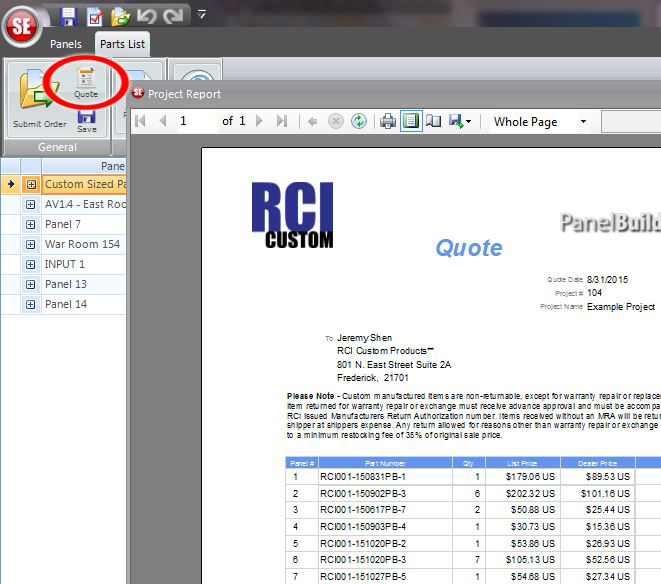
PBSE allows users to print or save a quote for each project. When the software generates the quote it will show the part number, quantity, price, order total and additional information. This is useful if the user designing the custom panels can not submit orders without permission from the purchasing department.
If you can not submit purchase orders we advise you to submit the PBSE order through the software and when asked for a PO type "HOLD FOR FORMAL PO". This will allow RCI to see your drawings but the order will not be released to the shop until a formal PO is submitted.
Simply print of the quote given to you in the software and have your purchasing submit their formal PO to RCI with the part numbers and price given in the software.
To print a quote follow the below instructions.
Go to "Parts List" page
Click on the "Quote" button near the top left corner
Once the window pops up you will be able to print or save the quote as a PDF
Have a suggestion for upgrades? We want to hear it!
Please e-mail us here.