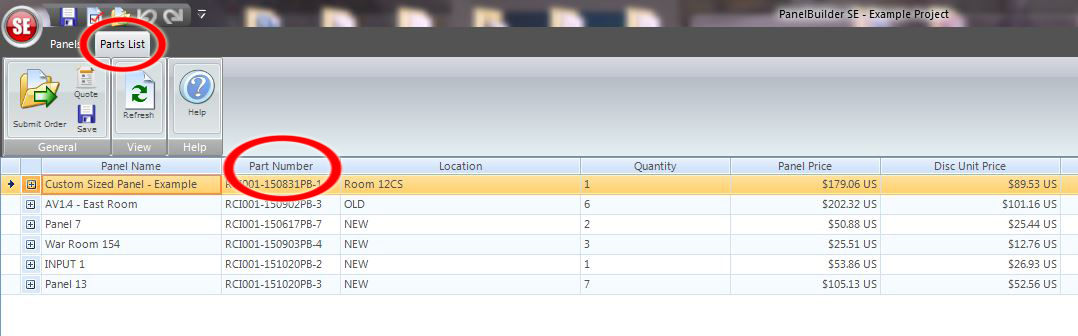
Panel Builder SE® now auto-assigns part numbers every time a new panel is created. This will allow
purchasing agents, system designers and integrators to have an RCI part number for ordering custom
designed plates and panels.
Make re-ordering faster and easier
Maintain the ability to name panels
Unique part numbers even with multiple users from the same company
Save your custom plates and panels with RCI part numbers
Part numbers will appear on the "Parts List" page and on all block drawings and quote.
Understanding your unique part number Each time a new panel is created, Panel Builder SE® will automatically assign a new and unique part
number to that panel. Below is an example of what that part number will look like.
RCI001-150421PB-3
- The first part of your unique part number (ex. RCI001-...) is your dealer code. This is assigned by RCI
Custom. If you are a new dealer and this is your first order your default customer code will be your first 3 letters followed by "xxx". After
your initial Panel Builder SE® order you will be assigned a new and permanent customer code.
- The number sequence following your dealer code (ex.150421PB-) is the date the part was drawn (year
'15', month '04' and Day '21'). The date sequence is determined by when a new panel is started, not when
or if changes are made to that panel at a later date. The "PB" at the end of the date sequence indicates this
part was drawn using Panel Builder SE®.
- Finally, each part number ends with a drawing number (ex. -3). This
indicates the order in which the panel was created. If an instance occurs
when multiple Panel Builder SE® users from the same company are both
creating drawings on the same day, Panel Builder SE® will auto-assign the
next available number. This can make the part numbers appear out of
sequence but does not affect the ordering process. This assures that each
custom part drawn will have a unique part number even when multiple
users within the same company are working within Panel Builder SE®.
FAQs What will happen to my Panel Builder SE® panels created prior to the auto-assign feature?
When a project is copied over for re-ordering all of the old user assigned part numbers or panel names will
remain the same. To obtain an RCI part number users must create a new panel. This ensures a seamless
integration between Panel Builder SE®, RCI Custom and purchasing agents.
Can I re-order using the auto-assigned part number by sending in a P.O. or do I need to re-submit
my old Panel Builder SE® order?
You will be able to re-order by simply sending RCI Custom a Purchase Order using the part numbers and
pricing from the original order. If changes need to be made to the part, a new panel must be drawn with a
new unique part number.
Can I still use the "My Panels" feature?
Yes, users may still save a part in the "My Panels" folder for future ordering. This part will be saved with the
original auto-assigned part number that it was created with. Users will have the ability to re-order the same
exact part or copy the part over to a new auto-assigned part number if changes are required. Please be
aware that anytime there are any changes, small or big, a new part number will be required.
How will RCI Custom see my part?
RCI Custom can not see projects or individual parts until a project is submitted or shared with RCI Custom
by the user. Once a project is submitted or shared, RCI can view drawings, pricing and part information. RCI
does not have the ability to alter drawings when a project is submitted. Likewise, users can not make any
changes to projects once the order has been submitted.
Will I still get auto-assigned a part number when working offline?
No. While Panel Builder SE® allows you to work within the program and save projects locally, users must
be connected to the internet to utilize the software's full capabilities. If not connected to the internet part
numbers will be assigned a default number.
Have a suggestion for upgrades? We want to hear it!
Please e-mail us here.